
How to Clean Up a Large Shopify Catalog Without Destroying Your SEO
The problem
When a supplier discontinues a product, Shopify doesn’t clean up after them. The page stays live, the URL stays indexed, and customers land on a dead end. At scale thousands of products, multiple suppliers this becomes a silent SEO leak you can’t manage manually.
And if you try to fix it the obvious way, just deleting the products, you make it worse: lost rankings, broken internal links, and a subtle bug in Shopify’s handle system that keeps corrupting your URLs for months after.
I built a workflow to handle this properly. It uses a Python diff script, Matrixify, Screaming Frog, and a second script to catch the edge case nobody talks about.
Workflow overview
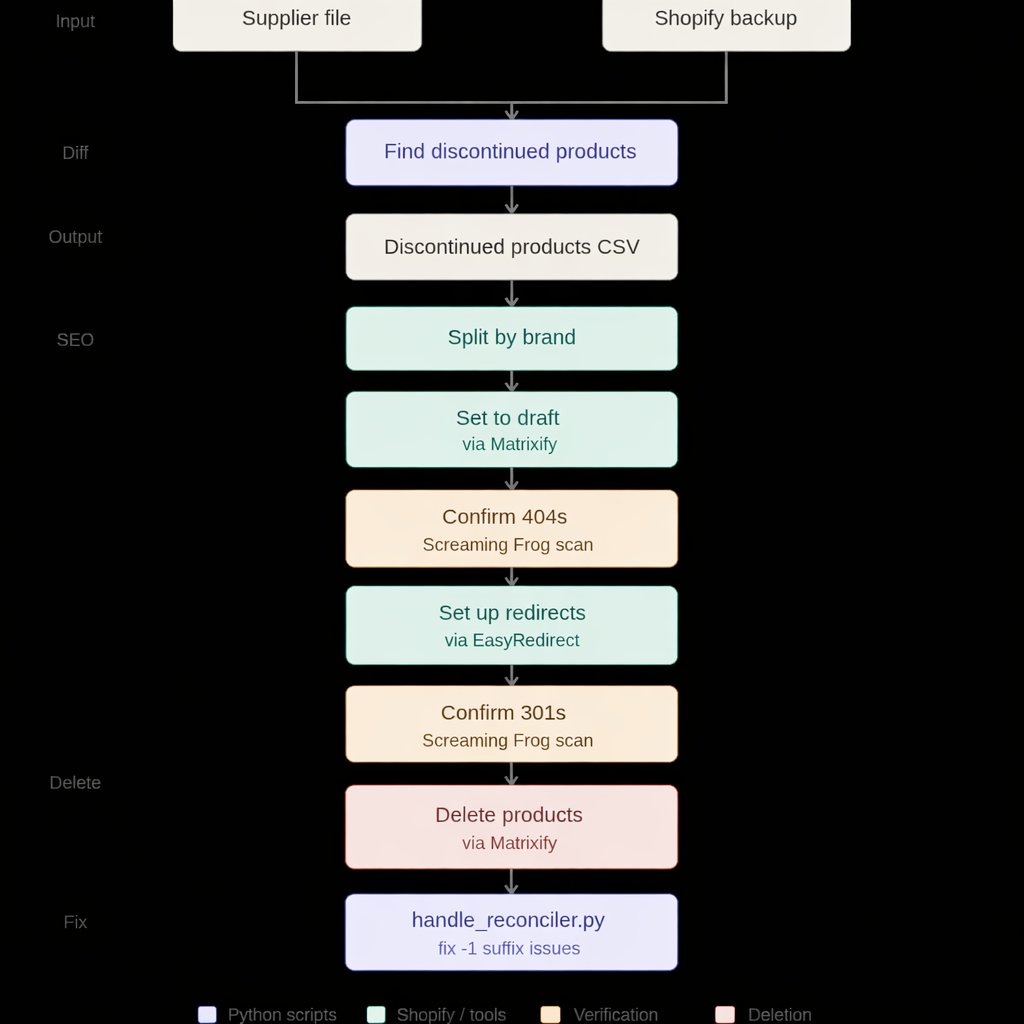
Step 1: Finding discontinued products 🔎
Every day I export a full backup of the Shopify catalog using Matrixify. Every time a supplier sends me their updated product file, I run catalog_diff.py — a Python script that compares the two files and identifies what’s missing.
The logic is straightforward: a left merge between the Shopify backup (left) and the supplier file (right), filtered on left_only. If a product’s barcode is in our catalog but not in the supplier’s file, it’s discontinued.
 def merge\_dfs(df\_mine: pd.DataFrame, df\_supplier: pd.DataFrame, barcode\_col: str) -> pd.DataFrame:

merged_df = df_mine.merge(

          df_supplier,

          how="left",

          left_on="Variant Barcode",

          right_on=barcode_col,

          indicator=True

      )

      return merged_df[merged_df["_merge"] == "left_only"].copy()
I also filter out any product that still has inventory available at any warehouse just because a supplier stopped listing it doesn’t mean we don’t have stock:
 def keep_only_items_not_available(df: pd.DataFrame) -> pd.DataFrame:

      inventory_columns = [c for c in df.columns if c.startswith("Inventory Available: ")]

      mask = (df[inventory_columns] > 0).any(axis=1)

      return df[~mask].copy()
The script is supplier-aware: each supplier has its own configuration (file paths, barcode column name, encoding) defined in a config.py file. You run it like this:
python catalog_diff.py —supplier supplier_name
The output is a CSV with all discontinued products, their handles, their URLs, and their current status — ready for the next step.
Step 2: Draft, check, redirect 🔄
Once I have the list of discontinued products, I don’t delete them immediately. That would be an SEO disaster.
You would:
-
lose all ranking signals tied to those URLs
-
send users to dead pages
-
create long-term crawl waste
Split by brand
Processing tens of thousands of products in a single batch is risky — both technically and from an SEO standpoint. Too many redirects at once can cause issues. I split the output file by brand and work one brand at a time.
Set to Draft
For each brand file, I set the Status column to Draft and import it into Shopify via Matrixify. This unpublishes the products from the storefront without deleting them.
💡 PRO TIP: The “Draft” Workaround for Non-Plus Plans
If you are not on a Shopify Plus plan, the platform does not always support automatic redirects from active pages when a product is removed. By switching the product status to Draft first, you effectively unpublish it from the storefront without deleting it from the database. This forces the URL to return a 404 status code, which is a critical “clean slate” that allows you to confirm the page is down before you manually apply your 301 redirects. It is the safest way to ensure your SEO signals are correctly transferred without relying on Shopify’s automated (and sometimes inconsistent) background processes.
Confirm 404 with Screaming Frog 🐸 After the import, I run a Screaming Frog crawl on all the URLs in the brand file. Every URL must return a 404 status code before I proceed. If anything still returns 200, I stop and investigate.
Set up redirects with EasyRedirect
With the 404s confirmed, I set up the redirects. I redirect:
-
Every discontinued product to the brand’s main category page
-
Sunglasses products to the sunglasses category
-
Eyeglasses products to the eyeglasses category
This keeps the redirect logic meaningful — users land somewhere useful, not just on a generic homepage.
I use EasyRedirect for bulk redirect imports via CSV.
Confirm 301 with Screaming Frog 🐸 Another Screaming Frog crawl. This time every URL must return 301. Only when all redirects are confirmed I move to deletion.
Step 3: Deleting products via Matrixify 🗑️
Now the products can be deleted safely. I open the original brand file, add a Command column with the value DELETE, and import it into Shopify via Matrixify.
| ID | Handle | Command |
|------------|---------------------|---------|
| 123456789 | brand-product-name | DELETE |
Matrixify handles large batches cleanly and gives you a full import log — which is essential when you’re deleting thousands of products at once.
The edge case nobody talks about: the -1 suffix problem
This is where things get dangerous.
Six months after deleting a product, the supplier brings it back.
You re-import it into Shopify… and something subtle happens.
Shopify detects that the original handle is already “in use” — not by a product, but by an active redirect.
So it silently creates a new one:
/products/brand-product-name-1
Now you have:
-
A redirect from
/products/brand-product-name→ category -
A live product at
/products/brand-product-name-1
This creates a serious SEO issue:
-
The original URL (the one Google knows) is no longer tied to the product
-
Internal links and backlinks keep pointing to the redirect, not the product
-
You slowly accumulate inconsistent URLs across your catalog
Left unchecked, you end up with hundreds of returning products at the wrong URL — and Google still indexing the old paths. I found this happening silently across months.
Here’s the script I built to fix it automatically.
Step 4: handle_reconciler.py 🔧
This script runs after new products are imported. It:
-
Loads the current Shopify product backup (exported via Matrixify)
-
Loads the current redirect file (also exported via Matrixify)
-
Identifies all products whose handle ends with a numeric suffix (-1, -2, etc.)
-
Checks if the original handle (without the suffix) has an active redirect
-
If it does, generates two Matrixify-ready CSV files:
-
One to delete the stale redirect
-
One to restore the original handle on the product
products_with_suffix = products[

products["Handle"].str.match(r"^.+-\d+", na=False)

].copy()


products_with_suffix["original_handle"] = products_with_suffix["Handle"].str.replace(

r"-\d+", "", regex=True

)


products_with_suffix["redirect_path"] = "/products/" + products_with_suffix["original_handle"]


active_redirects = set(redirects["Path"].astype(str).str.strip().values)


returning_products = products_with_suffix[

products_with_suffix["redirect_path"].isin(active_redirects)

].copy()
It also handles a few important edge cases: ⚠️
-
Excludes false positives: if brand-product-name still exists as an active product, brand-product-name-1 might be legitimate — the script skips it
-
De-duplicates: if both -1 and -2 exist for the same original handle, it only processes the lowest suffix
-
Produces a full audit log: every action is recorded in a timestamped CSV for traceability
The output tells you exactly what to import and in what order:
⚠️ Import order in Matrixify:
-
supplier_delete_redirects.csv → Redirects
-
supplier_fix_handles.csv → Products
The order matters: delete the redirect first, then restore the handle. Otherwise Shopify will create a -2 suffix.
Here’s exactly how it works.
A note on the redirect generated by the handle change 💡
When Shopify restores the original handle, it automatically creates a redirect from /products/brand-product-name-1 to /products/brand-product-name. At first glance this might look like another loose end to clean up.
In practice, it isn’t. Search engines typically take days or weeks to crawl and index a new URL. Since handle_reconciler.py runs immediately after the product import, the -1 URL has never been live long enough to be discovered — let alone indexed. The redirect exists, but it points nowhere Google has ever been.
Lessons learned 💡 Don’t skip the Screaming Frog checks. The double scan (404 before redirects, 301 after) adds time but gives you certainty. Deleting products before confirming the redirects are in place is a one-way door.
Split by brand, not by batch size. It’s tempting to just process N products at a time. But splitting by brand lets you prioritize, pause if something goes wrong, and keep the redirect logic meaningful.
Shopify will surprise you. The -1 suffix issue is not documented anywhere in a way that connects it to SEO. It looks like a minor URL quirk until you realize you have hundreds of returning products with broken handles accumulating silently over months.