How to Safely Clean Up Redirects with the GSC API
The problem
I was in the middle of solving a different problem: too many obsolete products piling up on my store. (I wrote about that one here: How to clean up a large Shopify catalog without destroying your SEO.)
Part of that cleanup meant importing a batch of redirects through Matrixify — the bulk import/export app I use to manage Shopify data at scale. Except they didn’t work. None of them.
After some investigation, I found the culprit: I’d hit another Shopify ceiling — the maximum number of redirects. The choice was simple:
- Option A: Pay for a higher Shopify plan (the easy, expensive, and lazy way).
- Option B: Clean house and prune the redirect table (the interesting way).
Honestly, the easy answer — almost certainly the smart answer — is to upgrade. Wading into a mass redirect cleanup where one wrong move puts you a step away from an SEO catastrophe is intimidating.
Naturally, I went with option two.
301s aren’t forever
A 301 redirect (“moved permanently”) tells search engines that a URL has moved for good, passing both users and ranking signals from the old URL to the new one.
Google confirmed years ago that 301s pass PageRank without the loss that older SEO folklore assumed. The “you lose ~10-15% of link equity per redirect” rule is outdated—treat a 301 as a full, clean transfer of signals.
But “permanent” doesn’t mean “leave it alone forever.” Redirects still need maintenance, and the reason is chains:
[URL A (Old Product)] ──(301)──> [URL B (Category)] ──(301)──> [URL C (Homepage)]Every extra hop in a redirect chain has a real cost:
- Latency: Browsers have to follow the full chain on every request, slowing down the site for users.
- Crawl budget: Search bots burn crawl budget on hops that shouldn’t exist.
The fix is simple in principle: flatten chains to a single hop whenever you find them.
But does Google remember the transfer?
Once Google has fully processed a 301, is the transfer of signals actually permanent? Can we remove the redirect without losing anything?
Gary Illyes (Google, 2021): “Signals consolidate to the new URL for good after about a year. If you break the redirect at that point, the old page has to rebuild its own signals from scratch, even though the original backlinks still point to it.”
However, SEO practitioner Patrick Stox put that to the test for Ahrefs in early 2023. He removed the 301 redirects from four blog posts that had been redirecting for over a year:
- Referring domains dropped (links stopped flowing to the targets).
- Organic traffic barely moved (one post gained, one dipped, two stayed flat).
Patrick Stox (Ahrefs, 2023): “I’m not willing to conclusively say that permanent redirects pass value even after one year, but what Gary said seems to mostly hold true.”
This is a green light, not a blank check. For redirects Google digested long ago, pulling them is far lower-risk than the “301s are sacred forever” instinct suggests. This is exactly why I still gate every deletion behind the checks below rather than removing them blindly.
The safe-delete rule
A redirect is doing useful work only as long as Google hasn’t fully processed it. If the old URL no longer appears in a site:old-url search, it’s a candidate for removal.
But doing that manually for 100,000 URLs is impossible. I needed a rule I could apply at scale. I landed on two conditions—both must be true:
- Condition one: Zero impressions in GSC over the last 16 months.
If the old URL hasn’t appeared in a single Google search result in over a year, no user has seen it, and Google isn’t surfacing it. Sixteen months is the maximum window GSC exposes. - Condition two: The source URL is not in the active sitemap.
A sitemap is an explicit instruction to Google: “these URLs exist, please index them.” Removing the redirect while the URL is still in the sitemap creates a contradiction, resulting in 404 errors in Search Console.
The Cleanup Workflow
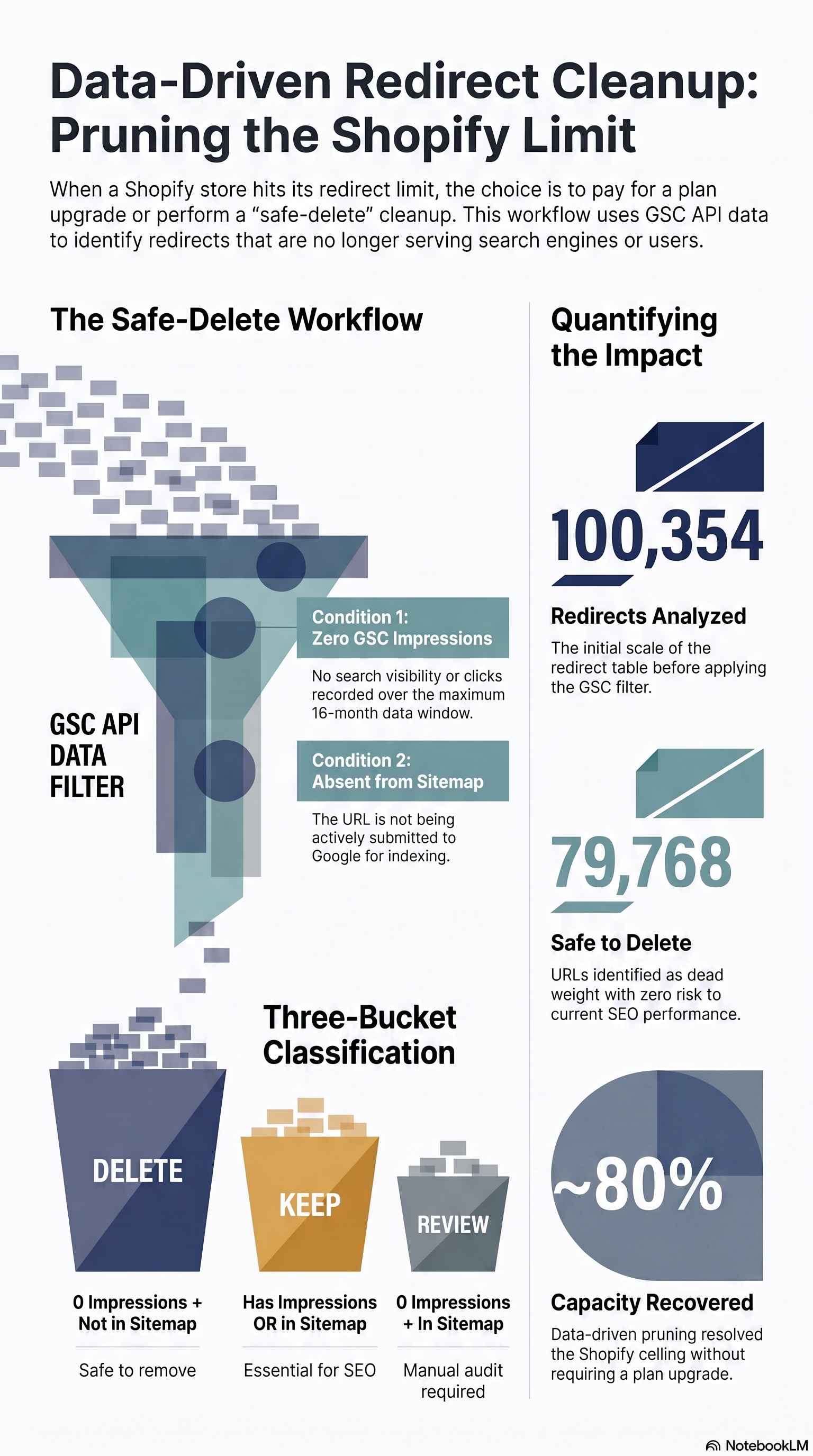
Here is the exact decision matrix I used to determine what to delete, keep, or review:
What this rule doesn’t cover:
- External backlinks: If another site links to the old URL, removing the redirect turns it into a 404. (Add a backlink check first if you have high-equity links).
- Internal links: If your own site points to old URLs, update those links first. Run a broken link audit.
What this rule does well: it gives you an objective, data-driven filter that separates the clearly dead from the potentially live. In my case, that was enough to identify 79,768 redirects I could safely remove.
How I built it (the GSC API part)
A rule is only useful if you can apply it to every redirect at once. Manually checking 100,000 URLs against Search Console isn’t a plan, it’s a punishment. So I wrote a script that does three things: pull impression data from Google, pull the active sitemap, and cross-reference both against the full redirect table.
Getting impressions out of Search Console.
GSC has a web UI, but it caps exports and won’t let you page through six figures of URLs comfortably. The API doesn’t have that ceiling. I used the Search Console API (searchconsole v1) with a single read-only scope — webmasters.readonly — authorized through an OAuth2 Desktop credential. The first run opens a browser to grant access; after that a cached token.json handles authentication silently.
The core call is searchanalytics().query() with page as the only dimension. That returns every URL Google recorded activity for, together with its impressions, over whatever date range you pass. I set the range to the full 16-month window GSC retains — in my run, 2024-01-01 to 2025-06-15 — the widest and most conservative net the data allows.
One catch: the API pages its results. A single query maxes out at 25,000 rows, so you loop — startRow 0, then 25,000, then 50,000 — until a response comes back empty. A short pause between pages keeps you from hammering the endpoint.
response = service.searchanalytics().query(
    siteUrl='https://lookeronline.com/',
    body={
        'startDate': '2024-01-01',
        'endDate': '2025-06-15',
        'dimensions': ['page'],
        'rowLimit': 25000,
        'startRow': start_row,
    }
).execute()
The mental model that matters: a URL that appears in this response has had at least one impression; a URL that doesn’t appear hasn’t surfaced in Google’s results at all. That absence is the signal I’m after.
Normalizing before you compare.
This is the boring part that quietly decides whether the whole thing works. GSC returns full URLs, the Matrixify export gives you paths, and the sitemap gives you full URLs again. Trailing slashes, www vs non-www, the domain prefix — if these don’t match exactly, your set comparison silently misses and you’ll “find” redirects to delete that should never be touched. I stripped every URL down to a bare path with no trailing slash, across all three sources, before comparing anything:
path = (url
        .replace('https://lookeronline.com', '')
        .replace('https://www.lookeronline.com', '')
        .rstrip('/'))
Cross-referencing.
With the impression data collected into a path → impressions map, the rest is a pandas join. Load the redirect export (redirects.xlsx), map each redirect’s source path to its impression count (0 if absent), and flag whether the path is in the sitemap:
df = pd.read_excel('redirects.xlsx')
df['Path'] = df['Path'].str.rstrip('/')

df['impressions']     = df['Path'].map(gsc_urls).fillna(0).astype(int)
df['has_impressions'] = df['impressions'] > 0
df['in_sitemap']      = df['Path'].isin(sitemap_urls)
From there, every redirect falls into exactly one of three buckets — a decision tree, checked in order:
- Keep — the source URL has impressions. It’s still surfacing in search; leave it alone, sitemap or not.
- Review — zero impressions, but still in the sitemap. The borderline case from the previous section: Google isn’t showing it, yet you’re still submitting it. Manual check.
- Delete — zero impressions and not in the sitemap. Nothing surfaces it and nothing submits it. Safe to remove.
da_tenere     = df[ df['has_impressions']]                        # Keep
da_verificare = df[~df['has_impressions'] &  df['in_sitemap']]    # Review
da_eliminare  = df[~df['has_impressions'] & ~df['in_sitemap']]    # Delete
Each bucket is written to its own CSV. Crucially, the script deletes nothing — it only classifies. The destructive step stays a separate, deliberate action I take by hand.
The result
100,354 redirects went in. 79,768 came out classified as safe to delete — a little under 80% of the table. A few thousand landed in the review bucket; the rest I kept.
I imported redirect_da_eliminare.csv back into Matrixify, this time with DELETE in the Command column, and let it run. The redirect count dropped back under Shopify’s ceiling, the failed import from the original catalog cleanup finally went through, and I never touched the plan upgrade.
Caveats (read these before you copy the approach)
I covered the two big blind spots earlier — the rule doesn’t check external backlinks or internal links, so audit those separately before a mass delete. Beyond that, a few implementation details bit me along the way and are worth flagging:
- The Shopify sitemap sits behind Cloudflare. Fetching it with a naive script gets you blocked. I had to send browser-like request headers and add a ~3-second delay between requests to stay under the radar.
- Multi-market URLs need filtering. The store runs Shopify Markets, so the sitemap and redirect table are full of language-prefixed paths (
/fr/,/it/,/de/, …). I filtered these out explicitly so the comparison only ran against the canonical set instead of triple-counting the same page across markets. - 16 months is a hard ceiling, not a choice. GSC simply doesn’t retain data further back. A URL with zero impressions in that window could have had traffic 18 months ago. For a store churning through discontinued product pages, that risk is acceptable; for a site with long-lived evergreen content, weigh it more carefully.
- Normalization is where correctness lives or dies. I said it above and I’ll say it again, because a single mismatched trailing slash is the difference between “safe to delete” and “just 404’d a page that gets traffic.”
Takeaway
Before you pay for an upgrade, measure what you’re actually using. Shopify’s redirect limit framed the problem as buy more capacity, but the real question was how much of this capacity is doing anything at all? — and the answer was: barely a fifth of it.
The Google Search Console API is what turned that from a guess into a number. Impression data is Google telling you, from its own records, which URLs are still alive in search and which have gone quiet. Once you have that, the decision stops being nervous and starts being arithmetic. Roughly 80% of a six-figure redirect table was dead weight, and I could prove it before deleting a single entry.
You don’t always need a bigger plan. Sometimes you just need the data to see what you can safely throw away.